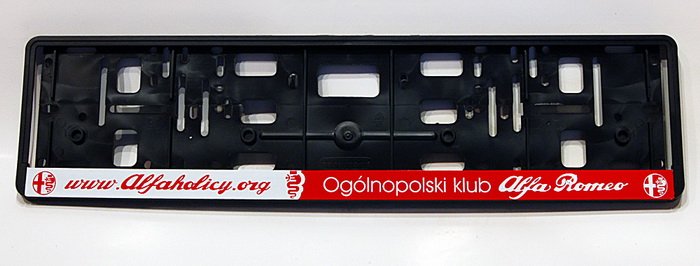
• Jeśli chcesz dodać swojej Alfie charakteru i jednocześnie zaznaczyć przynależność do naszej społeczności – to dobry moment, żeby je zamówić.

    Ramki Alfaholicy

    Szczegóły, zdjęcia oraz informacje o zamówieniu znajdziesz tutaj.

    Nie czekaj, bo jak zwykle schodzą szybko.

Android Auto

I got Carlinkit 4.0 and it really is a disaster, but for reasons different from what someone wrote above. It connects to the car without problems, the delays are barely noticeable but... The contents of the interface are still displayed in the proportions for a 6.5" display, with it in the middle of the screen and without that AA logo, which is normally on the right. I don’t know how much this matters, but originally I had a small 6.5" display, but I replaced it with an 8.8" one and perhaps even if I connected an iPhone the image would be “small.” There is one more issue and I think it’s a bigger problem: you can’t fully control the knob, rotation works, but right, left do not, which means you can’t move the cursor horizontally across the screen, which completely rules out using this dongle.

Epsonix, if you manage to unlock full-screen AA in the 2nd-gen radio, even though I know you’re tired of commercial tinkering with Alfas, maybe this time… :)View attachment 286097

I sent you a private message. I have a idea and maybe it will work the way we want
 
Hello.
This morning Coolwalk AA started up for me just like in the attached picture. The screen is non-touch, is there a chance it could display in fullscreen without the AA logo?
signal-2023-02-09-07-24-12-498.jpg
 
Hello.
This morning Coolwalk AA started up for me just like in the attached picture. The screen is non-touch, is there a chance it could display in fullscreen without the AA logo?
View attachment 286102
For now it seems no one has figured this out...
It begs to have, instead of the AA logo, display, for example, another app in a split-screen window!
 
I got Carlinkit 4.0 and it really is a disaster, but for reasons different from what someone above wrote. It connects to the car without problems, the delays are barely noticeable but... The content of the interface is still displayed in the proportions for a 6.5" display, with it in the middle of the screen and without the AA logo, which normally is on the right. I don’t know how much this matters, but I originally had a small 6.5" display, but I replaced it with an 8.8" one and perhaps even if I plugged in an iPhone the image would be “small.” There is one more issue and I think it’s a bigger problem: you can’t fully control the knob, rotate works but right, left do not, which means you can’t move the cursor horizontally across the screen, which completely rules out using this dongle.

Epsonix, if you manage to unlock full screen AA in the 2nd-gen radio, even though I know you’re fed up with commercial tinkering in Alfas, maybe… :)View attachment 286097
I didn’t describe everything, but a small screen, no DPI change and no control was also there for me, while I focused on touch control which was random and slowed the operation, so overall it was unusable for me; easier to connect by cable than forcing yourself to deal with something.

Sent from Stelvio
 
I didn’t describe everything, but a small screen, no DPI change and no control was also there for me, while I focused on touch control which was random and slowed the operation, so overall it was unusable for me; easier to connect by cable than forcing yourself to deal with something.

Sent from Stelvio

Do I understand correctly that you have polifta and on AA cable you have fullscreen, but through Carlinkita you don’t?
 
after updating AA to version 8.7 something and the signal going through the extra AA/CP module, it now displays on the full screen. works over Wi-Fi
329586269_891875572048441_5904230085802492633_n.jpg330268211_566503288738262_7259503554217279965_n.jpg
 
Yesterday morning I was also surprised by the new display method: I have a 6.5-inch screen, a 2016 production car used since 2018 but the radio was replaced under warranty with one that already runs AA/CP (AA on the phone continuously updated via APK Mirror). Unfortunately, this screen split seems to be just a gimmick because I can only see navigation (any) and the player/radio at the same time. I can’t, for example, swap their places, and in the player section, when I have the list of radio stations on, there are only 3 stations with no possibility to scroll further. Unless I’m not sure how to use it :)
 
I don’t know, but since they say they use the projection from the radio through CP even for AA over wifi, who knows?
Even if it works, the question is what gaps will there be? I started AA today and despite the old interface the advantages of AA appeared right away and I missed my Android phone. Work is also ongoing to unlock full screen in 2nd-gen radios, in the AA UI itself—this would be without the possible drawback of bridging it through CarPlay - we’ll see what comes of it.

- - - Updated - - -


I installed aa8.8 from apkmirror after uninstalling the original aa from Play, still not the CQ. Maybe it will be like the previous AA UI from 3 years ago—appeared gradually for users.

Where did the information about updating the radio to full screen in AA come from? Is it confirmed info?
 
Where did the information about updating the radio to full screen in AA come from? Is it confirmed info?

FCA has it screwed up, not talking about them but about a friend who managed so far to only disable the logo but unfortunately the screen remains small


after updating AA to version 8.7 something and the signal going through the extra AA/CP module, it shows on the full screen from today. works over Wi-Fi
well, but you have AA from a box iSmart - there it was always full screen


I don’t know how important it is, but I originally had a small 6.5" display, but I replaced it with 8.8" and perhaps even if I connected an iPhone the image would be “small.”
for CarPlay it doesn’t matter - it showed on pre-facelift with original 6.5 after replacing the display to 8.8 for full screen.
 
Last edited:
FCA

well, but you have AA from the box iSmart - there it was always full screen

Exactly that it didn’t work on full screen, instead of the AA logo there was a clock and date. Indeed it was possible to split the screen but Google Maps or AutoMate or any other apps were never full screen as after the Android update.
sorry for the photo quality, like from the 19th century
the way it was
received_936555907711071.jpg
 
for CarPlay it doesn’t matter - it displayed on pre-facelift units with original 6.5 when replacing the display to 8.8 full screen.

Yes, I noticed that the dongle Carlinkit’s own menu is displayed full screen, but AA itself is "small" scaled to 16:9, the same size as wired, just shifted to the center of the display. The worst is that the "Joystick" doesn’t work, only the knob works so we can move the cursor up and down, and only along the left-hand strip, and you can’t switch to this main screen. I tried changing firmware to older - newer but it didn’t change anything. 20230209_114147.jpg20230209_114821.jpg
 
Exactly that it didn’t work on full screen, instead of the AA logo there was a clock and date. Indeed it was possible to split the screen but Google Maps or AutoMaps or any other apps were never full screen as after the Android update.
sorry for the photo quality, like from the 19th century
the way it was
View attachment 286113
OK, I get it


Yes, I noticed that the dongle Carlinkit’s own menu is displayed full screen, but AA itself is "small" scaled to 16:9, the same size as on a wired connection, only it’s shifted to the center of the display. The worst is that the "Joystick" doesn’t work, only the knob so we can move the cursor up and down, and only along the left-hand strip, and you can’t switch to this main screen. I tried changing firmware to older - newer but it didn’t change anything.

well then still crap
 
Yes, I noticed that the dongle Carlinkit’s own menu is displayed full screen, but AA itself is "small" scaled to 16:9, the same size as on a wired connection, only it’s shifted to the center of the display. The worst is that the "Joystick" doesn’t work, only the knob so we can move the cursor up and down, and only along the left-hand strip, and you can’t switch to this main screen. I tried changing firmware to older - newer but it didn’t change anything. View attachment 286115View attachment 286116

Did you try in Android Auto settings on the phone to enable Developer mode and change the resolution?
 
No, AAWireless is only a USB-to-WiFi bridge and the screen is still limited the same as wired— the only thing AAWireless offers is the ability to change the DPI. I asked the AAWireless designer and they said nothing can be done regarding wide-screen support (in pre-facelift cars) because the radio enforces it. In post-facelift you get wide as with wired.
 
Last edited:
AAWireless, 2021 model
The map may be on the right, small, and the music larger or full screen.
I haven't tested wired yet.
I see that skipping the 2019 model purchase was a perfect decision.

19.jpg
20.jpg
 
Last edited:
Amortyzatory
Back
Top