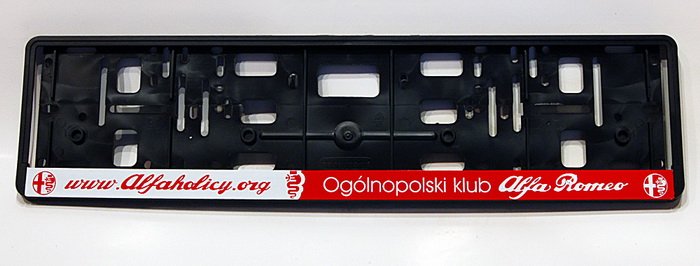
• Jeśli chcesz dodać swojej Alfie charakteru i jednocześnie zaznaczyć przynależność do naszej społeczności – to dobry moment, żeby je zamówić.

    Ramki Alfaholicy

    Szczegóły, zdjęcia oraz informacje o zamówieniu znajdziesz tutaj.

    Nie czekaj, bo jak zwykle schodzą szybko.

Android Auto

Has anyone here bought such a gadget in the latest version fatbat.pl/products/carlinkit-4-0-bezprzewodowy-modul-android-auto-apple-carplay and tested it for a longer time?

I use the older ver 3 with an iPhone, very stable; only the original USB-C cable was failing, wouldn’t charge any devices, I had to use my own, but none would fit because of the casing, so I had to trim my own cable at the plug. It’s been working for a year very stably. The instructions were lousy, had to contact a Chinese seller to update the dongle.

The one you link redirects to carplay for radios, both carplay and Android Auto of the phone, so even in pre-facelifts it should run on full 8.8. I don’t know how it will be with Navi arrows on the instrument cluster or switching to phone, headset on the steering wheel, on CarPlay this doesn’t work (when I had Android it did), but that’s a minor detail.

Personally I’m considering returning to Android, iPhone and CarPlay is fine, just one drawback – Siri is missing (and it doesn’t look like iOS 17 in the fall will speak Polish, you can’t communicate in English either for calls or navigation TomTom, I miss Android).
Curiously I pulled out an old phone from the drawer, AA 8.6 installs and for now I don’t have CoolWalk, that old UI doesn’t look good to me with CarPlay. Maybe in a few days there will be CW, or I’ll manually install AA 8.8 from apkmirror (Android 8) and maybe it helps?
 
Last edited:
I use the older ver 3 with an iPhone, very stable; only the original USB-C cable was failing, wouldn’t charge any devices, I had to use my own, but none would fit because of the casing, so I had to trim my own cable at the plug. It’s been working for a year very stably. The instructions were lousy, had to contact a Chinese seller to update the dongle.

The one you link redirects to carplay for radios, both carplay and Android Auto of the phone, so even in pre-facelifts it should run on full 8.8. I don’t know how it will be with Navi arrows on the dashboard or switching to the phone, headset on the steering wheel, on CarPlay this doesn’t work (when I had Android it did), but that’s a minor detail.

I personally am considering returning to Android, iPhone and CarPlay is fine, just one drawback - Siri is not present (and there’s no sign iOS 17 in fall will speak Polish, you can’t communicate in English for calls or TomTom navigation; I miss Android).
Curiously I pulled an old phone from the drawer, AA 8.6 installs and for now I don’t have CoolWalk, that old UI doesn’t look good to me with CarPlay. Maybe in a few days CW will appear, or I’ll manually install AA 8.8 from apkmirror (Android 8)?

You say there’s a chance for full screen AA in the pre-facelift via this CarLinkit 4.0, is that confirmed?
 
(...) or I’ll manually install AA 8.8 from apkmirror and maybe that helps (Android 8)?

With 8.8 I don’t have CW yet. Apparently it depends not on the AA version but on the car. There are people who had CW with 8.6 but they didn’t have Alfa :) For clarity: I have a 6.5-inch screen. I changed almost everything in the car, but the screen stayed small. I won’t change it now because I have an attractive offer to change the car. But maybe at the end of the year.
 
You say there’s a chance for full screen AA in the pre-facelift via this CarLinkit 4.0, is that confirmed?

I don’t know, but since they say they use projection from radio via CP even for AA over wifi, who knows? Even if it works, the question is what are the gaps? I launched AA today and despite the old interface, the advantages of AA came out right away and I missed my Android phone. Work is also ongoing to enable full screen in 2nd-gen radios, in the AA interface in the radio itself – that would be without the downsides of bridging it through CarPlay – we’ll see what comes of it.

- - - Updated - - -

With 8.8 I don’t have CW yet. Apparently it depends not on the AA version but on the car. There are people who had CW with 8.6 but they didn’t have Alfa :)
For clarity: I have a 6.5-inch screen. I changed almost everything in the car, but the screen stayed small. I won’t change it now because I have an attractive offer to change the car. But maybe at the end of the year.
I installed aa8.8 from apkmirror after uninstalling the original aa from Play, still no CW. It may be like with the previous AA UI from 3 years ago – it appeared gradually to users.
 
Last edited:
Hi there, the new interface doesn’t seem to depend entirely on the Android Auto version on the smartphone; I read about it somewhere and that would make sense because I’m still on 8.6, while the new Coolwalk has been ruling since yesterday. Google is methodically "pushing" it to subsequent users... what worries me more is that Google Maps has been losing GPS for me for some time now, despite several updates the issue remains current, I also saw somewhere that it’s a Google problem. Can you confirm this?

Sent from my 21081111RG using Tapatalka
 
I installed aa8.8 from apkmirror after uninstalling the original aa from Play, still no cw. maybe it will be like with the previous aa UI from about 3 years ago - appeared gradually for users.

@epsonix Which exact version did you install from apkmirror? please provide all digits.

And pay attention to the text that some guy posted there, it might work for you:
"Remarks: After install I deleted the cache and Coolwalk was not present. I restarted the phone... and it suddenly was there"
 
Anyway I ordered "this" CarlinKit 4.0 and I’ll see how it works for me. I’m annoyed by the unused screen to such an extent that I was going to replace my S22+ with an iPhone, but since a chance has appeared I’ll first try through Carlinkita.

And regarding unlocking full screen in radios (head units) of the 2nd generation - it would be great...
 
Last edited:
Anyway I ordered "this" CarlinKit 4.0 and I’ll see how it works for me. I’m annoyed by the unused screen to such an extent that I was going to replace my S22+ with an iPhone, but since a chance has appeared I’ll first try through Carlinkita.

And regarding unlocking full screen in radios 2nd generation - it would be great...

If you can, give the link you ordered because there are many on Ali and everyone writes that their latest is the best etc.
 
Hi there, the new interface doesn’t seem to depend entirely on the Android Auto version on the smartphone; I read about it somewhere and that would be true because I’m still on 8.6, and the new Coolwalk has been ruling since yesterday. Google somehow methodically"lets" it into subsequent users... I’m more worried that Google Maps has been losing GPS for me for some time now, despite updates the issue remains current, I also saw somewhere that this is a Google problem. Can you confirm?

Sent from my 21081111RG using Tapatalka


You have so many navigations on AA and you use Maps? Free AmiGO is, in my opinion, much better, and Sygic is excellent.
 
Last edited:
Carlin 4.0 is a crap, random disconnects or failure to start and required USB pulling.
Touch operation on the screen is total nonsense.

Sent from Stelvio
 
Does anyone know if you can change the tiles/widgets on the side of the AA menu? Currently I have Maps, Spotify and OK Google, I would rather replace OK Google with, for example, calls or messages. On YouTube I saw a video where the guy has calls but doesn’t explain how he did it. I didn’t find such an option in the settings either. Of course you can move the menu down and then you get calls and settings but we reduce the map size.
 

Attachments

  • screenshot_20230206_111451.jpg
    screenshot_20230206_111451.jpg
    123.1 KB · Views: 49
  • 457468734.jpg
    457468734.jpg
    66 KB · Views: 43
Application icons on the left (or bottom – depending on the phone settings in Android Auto) are the most recently opened apps. If you open the phone, you’ll see the headset there.
 
Anyway I ordered this CarlinKit 4.0 and I’ll see how it works for me. I’m irritated by the unused screen to the point that I decided to replace my S22+ with an iPhone, but since there’s a chance I’ll try Carlinkit first.

And regarding unlocking full screen in radios 2nd gen – that would be great...

And how about testing that Carlinkit?
 
I got the Carlinkit 4.0 and indeed it’s crap, but for different reasons than someone above wrote. For me it connects to the car without problems, delays are barely noticeable but... The content of the interface is still displayed in proportions as for a 6.5" display, with it in the middle of the screen and without that AA logo, which is normally on the right side. I don’t know how much this matters, but I originally had a small 6.5" display, but I replaced it with an 8.8" and maybe even if I connected an iPhone the image would be “small”. There is one more bigger problem: you cannot fully control with the knob, rotation works, but left and right do not, which means you cannot move the cursor horizontally, which completely excludes using this dongle.

Epsonix, if you manage to unlock full screen AA in a 2nd-gen radio, I know you’re tired of commercial tinkering in Alfas, but maybe... :)20230208_172933.jpg
 
Amortyzatory
Back
Top