
Aplikacja forum
Jak zainstalować aplikację na iOS
Podążaj za instrukcjami wyświetlonymi na poniższym wideo, aby zainstalować aplikację internetową na Twoim urządzeniu.
Uwaga: Ta opcja może nie być dostępna w niektórych przeglądarkach internetowych.
-
Hej Alfaholicy!
Na forum pojawił się świeżutki motyw kolorystyczny Alfa Red Luna, zaprojektowany przez marqo specjalnie z myślą o naszych Alfowych klimatach i czytelności na różnych urządzeniach.
Zachęcamy do:
- włączenia nowego stylu w ustawieniach profilu i potestowania go na co dzień
- zgłaszania uwag dotyczących kolorów, kontrastów, czytelności i wygody przeglądania dłuższych wątkich
- dzielenia się propozycjami drobnych poprawek, które mogą jeszcze lepiej dopasować motyw do charakteru naszej społeczności Alfaholików
Każda opinia pomoże dopieścić wygląd forum tak, aby „Alfa Red Luna” była tak przyjemna w odbiorze, jak dobrze utrzymana Alfa na ulubionej trasie.
Twoja przeglądarka jest nieaktualna i może wyświetlać tę stronę nieprawidłowo.
Powinieneś zaktualizować ją lub skorzystać z alternatywnej przeglądarki.
Powinieneś zaktualizować ją lub skorzystać z alternatywnej przeglądarki.
Fiatdiag, TS Diag, Alfadiag
- Autor wątku bubu321
- Data rozpoczęcia

- Rejestracja
- Paź 21, 2005
- Postów
- 3,127
- Wiek
- 39
- Lokalizacja
- Koszalin, Gdynia
- Auto
- Ducati Hypermotard 796
155, 164 i GTV pójdzie na FES-ie
C
chomiko
Guest
jeśli ktoś potrzebuje diagnozy do Alfeczki, służę pomocą, złącze szerokie, kasujemy sprawdzamy wszystko, klime z kompa też odpalimy 
Jak coś to śmiało na PW. pomogę na 99%
TAK PS. sprawdzam FiatECUskan i Elfadiagiem, w zależności od kompa auta nie było problemów, zawsze możemy pogrzebać
U mnie sprawdzone wszystko, jak na razie idealnie i nawet przebieg sie zgadza 262k, na 2.4 nie jest tak źle
Jak coś to śmiało na PW. pomogę na 99%
TAK PS. sprawdzam FiatECUskan i Elfadiagiem, w zależności od kompa auta nie było problemów, zawsze możemy pogrzebać
U mnie sprawdzone wszystko, jak na razie idealnie
i nawet przebieg sie zgadza 262k, na 2.4 nie jest tak źle
Ostatnia edycja:

klaku156
Użytkownik

Mam poważny problem z AlfaDiagiem. Nie mogę go zainstalować. Otwieram loadera, wyswietla sie komunikat ze jakis nr został skopiowany do schowka, klikam ok, otwiera się AlfaDiag wklejam ten numer i po zatwierdzeniu prosi o zainstalowanie Net Framework. Instaluję, lecz po skończonej instalacji po kliknięciu w ikonę AlfaDiaga nie ma żadnej reakcji. Sprawdzane na 2 komputerach i jest to samo. co robić? Dodam, że chcę zrobić reset i adaptację silniczka krokowego. Mam następujące objawy: stałe falowanie na biegu jałowym 900-1100 obrotów, jest to falowanie o dużej częstotliwości, faluje non stop, po wciśnięciu pedału gazu obroty zostają powiedzmy na 4 tysiącach i nie chcą zejść niżej. FES wywala błąd P1513
Ostatnia edycja:
Ok działa, dzięki bubu, ale problem z falującymi obrotami nadal pozostał, nawet po zrobieniu resetu i adaptacji. Silniczek po włączeniu zapłonu w ogóle się nie uchyla, podczas przeprowadzania jego testu też go w ogólę nie slychać, alfa odpala ale obroty ciągle skaćza tak jak na załączonym filmiku http://www.youtube.com/watch?v=8u0EHdRYth0&context=C33730f6ADOEgsToPDskIdQbb6tL4y91zxPn-sDLjQ Macie jakieś pomysły?
A
Artur
Guest
Panowie i Panie, sprawa chyba bardziej dla jakiegoś informatyka, ale ale... kiedy załączę loadera, nic się nie pokasuje, żadnego komunikatu, nic! WTF? świeżutka kopia windows'a XP sp2, jeszcze ciepła,zainstalowałem windows installer, następnie net.framework ,alfaloader, ale nic dalej się nie dzieje. Windows postawiony na virtualbox'ie. Ktoś ma jakies przypuszczenia chociaż bo mi nic do głowy nie przychodzi już 
A
Artur
Guest
Tak bubu321, host to windows 7 dokładnie home premium 64 bit (orginalny) , zainstalowany virtual box, a w nim Windows xp professional z sp2. Żadnych antyvirusów, nic; czysty system z frameworkiem i windows installerem (wymagał go framenetwork do instalacji), właśnie pod alfadiag'a. A loader pokazuje się dosłownie na sekundę w menedżerze zadań i znika, ale nic poza tym się nie dzieje. i pupa zbita. Poszedłem do kuzyna aby obbadać sprawę na jego starym juz komputerze pentium I @400mhz ;D i bez zająknięcia loader się uruchomił a była to ta sama kopia zgrana na płytę. No ale tam nie było żadnych wirtualnych przekrętów. Jakieś pomysły?
Czy program Alfadiag będzie działał na systemie win 98' ? Ponieważ jeżeli nie znajdę rozwiązania, mogę się pokusić o wrzucenie do vb windows'a 98
Czy program Alfadiag będzie działał na systemie win 98' ? Ponieważ jeżeli nie znajdę rozwiązania, mogę się pokusić o wrzucenie do vb windows'a 98
Ostatnia edycja:
murek
Nowy
http://allegro.pl/interfejs-fiat-alfa-romeo-lancia-fiatecuscan-vag-i2031436031.html
ten kabel bedzie odpowiedni?
ten kabel bedzie odpowiedni?

bubu321
Nowy
- to chyba tyle w temacie win 98 pl.
Kod:
A. The minimum recommended specification for the machine that AlfaDiag is to run on are as follows:
# Processor*** 	550-megahertz (MHz) Intel Pentium-class processor or higher recommended.
# Operating System 	Windows XP Professional.
# Windows XP Home Edition.
# Windows 2000 all versions.
# Memory 	128 megabytes (MB) of RAM or higher MB recommended.
# Hard disk 	Approx. 5 MB of hard disk space required for installation.
# Display 	Minimum 800 x 600 or higher-resolution display with 256 colours.
# Serial Device 	One free RS232 serial port. A USB to RS232 will not function correctly.
# Other 	Install the latest Windows service packs and critical updates from the Windows Update site.
# Install the latest version of the .NET Framework Version 2.0.
A
Artur
Guest
Jeżeli polujesz na włoszkę, o jakże znamienitym numerze 156, to tak, ten będzie odpowiedni.http://allegro.pl/interfejs-fiat-alf...031436031.html
ten kabel bedzie odpowiedni?
Też mi się tak wydaje- to chyba tyle w temacie win 98 pl.
B
bargy
Guest
Help needed!!!
Hello everybody. Sorry I can only speak English & Greek, I need some help.
I have an Alfa 147, I can't find a copy of alfadiag (latest version) and it's not easy to search the forum (I don't know the language)..
Please PM me for info or a link
Thanks in advance!
By the way, is there any software that can reset the blinking milage (service schedule)?
Is there any better program than Alfadiag for my car?
Hello everybody. Sorry I can only speak English & Greek, I need some help.
I have an Alfa 147, I can't find a copy of alfadiag (latest version) and it's not easy to search the forum (I don't know the language)..
Please PM me for info
or a link Thanks in advance!
By the way, is there any software that can reset the blinking milage (service schedule)?
Is there any better program than Alfadiag for my car?
bubu321
Nowy
hi,
- please specify which model you have AR 147, the TS and the JTD are other programs for diagnostics.
- for the AR 147 TS is a good program Alfadiag and AlfaOBD.
- here you have a direct link to the alfadiag
1. http://www.4shared.com/file/135713799/80a83f99/31_online.html
2. http://www.4shared.com/file/tZx79LCD/AD_Demo33011.html
- and a brief instruction on how to run these programs
NOTE: This program runs only under Windows XP !!!!!
- In time to block the installation of anti-virus programs or run out of safe mode (F8 key at boot time.).
- please specify which model you have AR 147, the TS and the JTD are other programs for diagnostics.
- for the AR 147 TS is a good program Alfadiag and AlfaOBD.
- here you have a direct link to the alfadiag
1. http://www.4shared.com/file/135713799/80a83f99/31_online.html
2. http://www.4shared.com/file/tZx79LCD/AD_Demo33011.html
- and a brief instruction on how to run these programs
NOTE: This program runs only under Windows XP !!!!!
- In time to block the installation of anti-virus programs or run out of safe mode (F8 key at boot time.).
- sorry for my English but this is not my native language.1. program 3.1 unzip to directory example C:\alfadiag
2. run from this directory alfadiag-loader.
- alfadiag_loader if he does not start the program alfadiag follow steps A and B.
A. - CTRL C and write code in notepad (CTRL V).
B. - run from this directory alfadiag.exe, CTRL V or give written code.
3. extract 3.3.0.11 file to a temporary directory.
4. start installing 3.3.0.11 form the temporary directory, giving as a destination folder previous folder example C:\alfadiag.
Ostatnia edycja:

mirage
Nowy
Ja wiem, że to jest bardzo stary post kolegi arq ale miałem to samo z interfejsem i dzisiaj udało mi się połączyć i myślę że dla potomnych może się to przydać.
Mi osobiście pomogły dwie rzeczy :
1- mój interfejs był z przełącznikiem : poduszki - silnik - naklejka była odwrotnie przyklejona i wystarczyło przełącznik w drugą pozycję zmienić
2- w ustawieniach portu szeregowego (win 7 ->system -> menedżer urządzeń->porty (com i lpt)-> <wybrany wirtualny port COM> ->ustawienia portu-> sterowanie przepływem -> sprzętowe
Jakby nadal był problem to warto sprawdzić w zaawansowanych ustawieniach opóźnienia, ja mam ustawione na 1ms.
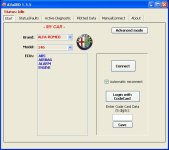
I tak przy okazji, dzisiaj pierwszy raz połączyłem się z moją alfą i co ciekawe, podczas połączenia się z programem DnEcuDiag, wybierając ECU 2.10.4 program wyświetlił mi takie szczegóły (a w zasadzie ich nie wyświetlił, win7 32bit, netbook) :

Poza tym, nie mogłem żadnych czujników sprawdzić, była tylko prędkość auta i jeszcze jakaś inna i w zasadzie nie wyglądało to na dobrze działający program
Próbowałem FiatECUScan'em ale niestety wersja demo nie pozwala mi na sprawdzenie mojego auta tylko na jakąś tam symulację Czy mogę liczyć na Waszą pomoc? Jeśli tak to poproszę o PM'a Podczas gdy wyświetlił mi komunikat o wersji demo, w tym samym czasie na chwilę wyświetlił informacje o moim ecu i te były tam kompletne.
Pozdrawiam!
Witam
Pomoże mi ktoś,próbuje połączyć moją alfę z alfadiagiem i oczywiście nie dochodzi do połączenia,robię test connection,i wywal mi ten jeden error w którym nie wiem o co chodzi
UseUSB: True
SerialPort: COM3 : Winachsf0
KwpTiming:
RequestInterByteTime: 5
EcuResponseTimeout: 1500
EcuResponseInterbyteTimeout: 100
IsoTiming:
RequestInterByteTime: 5
EcuResponseTimeout: 1500
EcuResponseInterbyteTimeout: 150
Sending bytes: [ 55 AA 55 AA 55 AA 55 AA ]
Received bytes:[ 55 AA 55 AA 55 AA 55 AA ]
Expected Bytes: 1 Received Bytes: 1 Total wait time: 0 ms
Expected Bytes: 1 Received Bytes: 1 Total wait time: 0 ms
Expected Bytes: 1 Received Bytes: 0 Total wait time: 5007,2 ms
Error:Serial Device Timeout Exception: ISO00: Timeout reading INIT byte [1] Timeout: 5000
Test Complete
O co chodzi w tym błędzie
Prosze o pomoc
Dziękuje
Mi osobiście pomogły dwie rzeczy :
1- mój interfejs był z przełącznikiem : poduszki - silnik - naklejka była odwrotnie przyklejona i wystarczyło przełącznik w drugą pozycję zmienić
2- w ustawieniach portu szeregowego (win 7 ->system -> menedżer urządzeń->porty (com i lpt)-> <wybrany wirtualny port COM> ->ustawienia portu-> sterowanie przepływem -> sprzętowe
Jakby nadal był problem to warto sprawdzić w zaawansowanych ustawieniach opóźnienia, ja mam ustawione na 1ms.
I tak przy okazji, dzisiaj pierwszy raz połączyłem się z moją alfą i co ciekawe, podczas połączenia się z programem DnEcuDiag, wybierając ECU 2.10.4 program wyświetlił mi takie szczegóły (a w zasadzie ich nie wyświetlił, win7 32bit, netbook) :

Poza tym, nie mogłem żadnych czujników sprawdzić, była tylko prędkość auta i jeszcze jakaś inna i w zasadzie nie wyglądało to na dobrze działający program
Próbowałem FiatECUScan'em ale niestety wersja demo nie pozwala mi na sprawdzenie mojego auta tylko na jakąś tam symulację
Czy mogę liczyć na Waszą pomoc? Jeśli tak to poproszę o PM'a Podczas gdy wyświetlił mi komunikat o wersji demo, w tym samym czasie na chwilę wyświetlił informacje o moim ecu i te były tam kompletne. Pozdrawiam!
Ostatnia edycja:

euroscan
Nowy
- Rejestracja
- Kwi 29, 2010
- Postów
- 710
- Lokalizacja
- Katy Wroclawskie/ Wrocław/ Legnica
- Auto
- 147 TS 1.6, bez wariatora
mirage
Nowy
Dziękuję za pomoc. Domyślam się, że nie lubią, też nie lubię, ale jak nie dało rady inaczej jak choćby przez wrzucenie załącznika ani obrazka w edytorze wiadomości (pod sam koniec wysyłania się zacinało) to przestawało to być już zabawne i zasoby mojej cierpliwości zaczynały dość drastycznie maleć. Spróbuję zaraz naprawić swój błąd. A ten alfaobd zadziała na ECU 2.10.4?oj na tym forum nie lubia jak ktoś daje także tło. a czemu nie alfaobd, jest przecież wersja 1.5 5 patrz.
