
-
Jeśli chcesz dodać swojej Alfie charakteru i jednocześnie zaznaczyć przynależność do naszej społeczności – to dobry moment, żeby je zamówić.
Szczegóły, zdjęcia oraz informacje o zamówieniu znajdziesz tutaj.
Nie czekaj, bo jak zwykle schodzą szybko.
You are using an out of date browser. It may not display this or other websites correctly.
You should upgrade or use an alternative browser.
You should upgrade or use an alternative browser.
error during PROXI alignment
- Thread starter daniels_74
- Start date
-
- Tags
- error electronics navigation proxi radio
- Polski
- English
- Italiano
- Alfa Romeo discussions in English
- Machine-translated text


epsonix
Quadrifoglio Verde
- Joined
- Oct 8, 2011
- Messages
- 11,313
- Car
- Ghibli'20 GS, Giulia'18 Q4, Tonale'23 MHEV, Spider'99 V6
I understand, probably cheaper to buy a central unit than to try to tinker with a problematic one.epsonix, unfortunately I won’t help. I’m avoiding messing with the B&M as much as possible
Tell me only, did you ever open the central unit and did you reprogram it, something like copying memory from one working unit to another dead one? If yes, tell me in a few words how it looked, what you needed, or is it a waste of effort.

t0m
Member
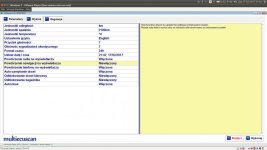
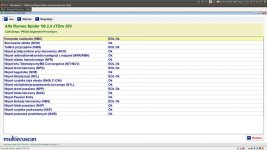
I finally got my beloved one back, so here are the promised pictures from my settings...Maybe someone with a B&M Nav can make a screenshot from MES in the PROXI settings tab?

epsonix
Quadrifoglio Verde
- Joined
- Oct 8, 2011
- Messages
- 11,313
- Car
- Ghibli'20 GS, Giulia'18 Q4, Tonale'23 MHEV, Spider'99 V6
And does this autoclose at the very bottom of the first picture control the car closing itself while driving or after turning off the engine and getting out. In other words, if you forget to close it?
Thanks. I’m surprised by the type of display; mine shows No Display/Voice HMI and yours Matrix/4 lines. Do you have in the Spider that large graphical display between the gauges, like in most 159s?
Maybe someone else with a 159 who has a B&M or B&M Nav could take a look at how it’s set up?
t0m
Member
epsonix
Quadrifoglio Verde
- Joined
- Oct 8, 2011
- Messages
- 11,313
- Car
- Ghibli'20 GS, Giulia'18 Q4, Tonale'23 MHEV, Spider'99 V6
Of course you posted it, something doesn’t click in my head today. Okay, I’ll try to rearrange it, remove B&M, do prox, then again – maybe there’s something here?Yes, the display between the gauges is normal, like in most 159s. A few posts above I pasted its photos – admittedly from the navigation playback, but you can see what it looks like.
t0m
Member
Probably, when you unlock the doors with the remote but don’t physically open them, after some time the locks should relock. The fourth option from the bottom is responsible for automatic locking while driving.And does this autoclose at the very bottom of the first picture control the car closing itself while driving or after turning off the engine and getting out. In other words, if you forget to close it?
epsonix
Quadrifoglio Verde
- Joined
- Oct 8, 2011
- Messages
- 11,313
- Car
- Ghibli'20 GS, Giulia'18 Q4, Tonale'23 MHEV, Spider'99 V6
t0m. it works!!! I changed the type of display to Matrix/4 lines and now I can see navigation. I haven’t plugged in the antenna yet, I played with entering an address – it’s a bit of a struggle, but there’s always a way and a gadget. Thanks for your screenshots, I had considered changing to that option earlier, but I thought since before the firmware update/proxy alignment I could see navigation, it didn’t make sense.
Now I’m only puzzled why before the firmware update and prox alignment it worked. Maybe there’s another possibility. I first tried aligning under the plant firm and I only had a phone with AlfaOBD. The alignment produced only failures and maybe changed something in the Proxi options too? Then at home I did a prox with MES that passed nicely, and only then did I perform firmware updates; in between I did not check whether navigation was available.
And now it finally recognizes maps on USB, before there were complaints about putting a USB stick with maps in.
Last edited:
t0m
Member

epsonix
Quadrifoglio Verde
- Joined
- Oct 8, 2011
- Messages
- 11,313
- Car
- Ghibli'20 GS, Giulia'18 Q4, Tonale'23 MHEV, Spider'99 V6
hopefully.
sorry for the OT, but maybe some of you were interested in adding B&M Nav, here’s a short demo of how this navigation works:
Unfortunately the map of Poland from 2010
- - - Updated - - -
I’ll definitely play with it a bit more. These maps should be obtained somehow, but I don’t think there’s anything currently on sale – did you perhaps see anywhere an up-to-date version for sale? Because what I saw on various sites like Mopar, they offer nothing for B&M Nav, only for large Navi on SD card.
sorry for the OT, but maybe some of you were interested in adding B&M Nav, here’s a short demo of how this navigation works:
- - - Updated - - -
Great, congrats!When you connect the antenna, the country and town are suggested immediately based on current position, which doesn’t change the fact that entering addresses is quite tedious. As a consolation, Recent destinations are easily accessible and at hand.

I’ll definitely play with it a bit more. These maps should be obtained somehow, but I don’t think there’s anything currently on sale – did you perhaps see anywhere an up-to-date version for sale? Because what I saw on various sites like Mopar, they offer nothing for B&M Nav, only for large Navi on SD card.
t0m
Member
The discussion about maps was some time ago here: http://www.forum.alfaholicy.org/159...alazlem_mapy_dla_blue__navigation_na_usb.html
If my memory serves, at the link mentioned there http://fcagroup.navigation.com/ there was an offer for a map update for B&M Nav. Now there’s only 'product not found' in that place. Thank you FCA.
If my memory serves, at the link mentioned there http://fcagroup.navigation.com/ there was an offer for a map update for B&M Nav. Now there’s only 'product not found' in that place. Thank you FCA.
Probably, when you unlock the doors with the remote but don’t physically open them, after some time the locks should relock. The fourth option from the bottom is responsible for automatic locking while driving.
Thanks mate. Is there an option in Alfas for the car to auto-lock when you forget, for example after driving and getting out? My car has no alarm and I once tested that it wouldn’t lock. I’ll check what you wrote to see if it will lock by itself when I unlock with the remote and don’t open the doors.
Sorry for the off-topic, but maybe this needs to be set in the ECU?
epsonix
Quadrifoglio Verde
- Joined
- Oct 8, 2011
- Messages
- 11,313
- Car
- Ghibli'20 GS, Giulia'18 Q4, Tonale'23 MHEV, Spider'99 V6
The fact is that this navigation really is terribly clunky - inputting is a nightmare, plus the maps are out of date. Such a thing was decent at the start of this millennium, but today it has no place, because even a free navigation app on a phone is 10x better, more advanced, etc.
But I fiddled with it for fun, though I was going to drop it to the side (only tom’s screenshots motivated me to try with a different display setting). If you still want to play with it, a few things:
I don’t know, maybe firmware change changed the display mode and you need to have it set with the latest Matrix (after all, my navigation worked before firmware updates without PROXI, and after updates and PROXI it stopped working, I don’t know what happened, what caused it, but it stopped).
Do you have updated firmware? Maybe these pictograms come from the maps, not from the B&M itself (e.g. every file somewhere in the header has it), maybe you have some slightly incompatible map format, like very old versions, or some newer ones and the central unit is not updated and it doesn’t talk to each other, or from another FCA car group (Bravo etc)?
awysocki93
New
- Joined
- Apr 9, 2018
- Messages
- 4
- Car
- Alfa Romeo 159
Hello, I have a problem with PROXI alignment.
I repaired the window regulator in the driver’s door. After putting everything back together, the mileage started flashing and the windows, locks, mirrors and external temperature sensor stopped working. The status for the driver door node (NPG) was "removed", I performed the alignment procedure and now it isn’t there at all... In CAN Info I have for the driver door node (NPG) the message "not present". Replacing the control unit with another (from a lower trim) didn’t help. What else can I do? Alternatively, where near Warsaw could I get this done quickly?
I repaired the window regulator in the driver’s door. After putting everything back together, the mileage started flashing and the windows, locks, mirrors and external temperature sensor stopped working. The status for the driver door node (NPG) was "removed", I performed the alignment procedure and now it isn’t there at all... In CAN Info I have for the driver door node (NPG) the message "not present". Replacing the control unit with another (from a lower trim) didn’t help. What else can I do? Alternatively, where near Warsaw could I get this done quickly?
epsonix
Quadrifoglio Verde
- Joined
- Oct 8, 2011
- Messages
- 11,313
- Car
- Ghibli'20 GS, Giulia'18 Q4, Tonale'23 MHEV, Spider'99 V6
PROXI started blinking because the module disappeared from CAN visibility, you did the alignment, accepted the change and the mileage doesn’t blink. Did you damage some cable, maybe unplugged a connector, maybe a short happened and a fuse blew? Check according to the eLearn diagram the grounds, power supply, and CAN continuity with a multimeter — if that’s okay and the module is functional, the module should be visible.