
-
Jeśli chcesz dodać swojej Alfie charakteru i jednocześnie zaznaczyć przynależność do naszej społeczności – to dobry moment, żeby je zamówić.
Szczegóły, zdjęcia oraz informacje o zamówieniu znajdziesz tutaj.
Nie czekaj, bo jak zwykle schodzą szybko.
You are using an out of date browser. It may not display this or other websites correctly.
You should upgrade or use an alternative browser.
You should upgrade or use an alternative browser.
error during PROXI alignment
- Thread starter daniels_74
- Start date
-
- Tags
- error electronics navigation proxi radio
- Polski
- English
- Italiano
- Alfa Romeo discussions in English
- Machine-translated text

epsonix
Quadrifoglio Verde
- Joined
- Oct 8, 2011
- Messages
- 11,312
- Car
- Ghibli'20 GS, Giulia'18 Q4, Tonale'23 MHEV, Spider'99 V6
I have model 50514602, didn’t have Navi, only a regular radio. I swapped to a 2-DIN radio and therefore I offered it.
From the central unit number it seems you had navigation, though you don’t know about it - I’ve never had live experience with that, from stories from another car/brand I know it worked with a regular radio and the Navi displayed something between the gauges (arrows?) and maybe it talks (in this case B&M) - I know a special map CD for the radio was used to make it work. It was another brand, but in the 159 it seems like there was something like that too (but I skipped because it didn’t concern me).
In conclusion, there are probably too big differences, central units are incompatible per ePer, but if you can return it, at worst just some time wasted and shipping costs.
bartek2424
New
bartek2424
New
epsonix
Quadrifoglio Verde
- Joined
- Oct 8, 2011
- Messages
- 11,312
- Car
- Ghibli'20 GS, Giulia'18 Q4, Tonale'23 MHEV, Spider'99 V6
OK, you mean the panel with the indicator light and buttons. yes, there I saw one SOS button in my friend’s car (Sport Plus from 2011), probably because it has Navi. besides you said near the mirror, you misled me by using the plural - buttons. I think there’s only one, and the rest I have without Navi (3 lamp buttons, PDC, a blanking plate that was before the lift near the trunk button and the last one indeed SOS which I don’t have either).
yes, 2009 is a facelift, apart from that it was visible from the B&M radio-navigation central unit number you have
yes, 2009 is a facelift, apart from that it was visible from the B&M radio-navigation central unit number you have

t0m
Member
From the central unit number it seems you had navigation, though you don’t know about it - I’ve never had direct experience, from stories from another car/another brand I know it worked with a regular radio and Navi displayed something between the gauges (arrows?) and may talk (B&M in this case) - I know a special map CD was inserted into the radio to make it work.
I’ll just add that this is called Blue&Me Nav. A very nice thing. It doesn’t distract the driver with a rotating map on a big screen, it provides simple info between the gauges when to turn, how long to drive, etc. It works with maps from a USB pendrive in the glovebox, from the same one that has MP3s for the media player (of course Nav works while playing MP3s). The only downside is somewhat tedious target address input. For me it’s the perfect mix of functionality and simplicity. And at the same time the only feasible compromise to have Blue&Me and navigation onboard. I use it and highly recommend it.
 There are separate threads about it, I recommend it.
epsonix
Quadrifoglio Verde
- Joined
- Oct 8, 2011
- Messages
- 11,312
- Car
- Ghibli'20 GS, Giulia'18 Q4, Tonale'23 MHEV, Spider'99 V6
t0m
Member
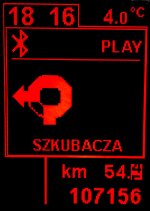
how does the navigation cope in the field basically depends on the maps. here it’s no different. I’d even say it’s more accurate than integrated navigations such as phone-type, because it has information from two sources: GPS receiver for position and from the CAN bus for the actually traveled distance. thanks to this a temporary loss of signal from satellites, e.g. in a tunnel (of course one can imagine a possible problem if there were forks in the road in the tunnel), but in Poland we have so many such situations that I haven’t encountered any so far. ;-) Since information from both sources is continuously compared, this solution also provides actual accuracy not worse than single meters. Therefore, if the driver isn’t speeding like crazy, there’s no doubt which side street to turn into. The same goes for roundabouts – there is a clear diagram and a voice prompt which exit to take. Below are a few sample photos...
Not to hide it, this navigation is quite simple. It won’t say anything about which lane to take before an intersection, nor whether you can expect traffic jams. If someone expects modern gimcracks, they’ll surely be disappointed. But I never treat navigation as a guide dog for the blind. For me it should be primarily a tool for moving efficiently in unknown terrain. I roughly grasp geography, and I even like it, so I decide which road to take. That’s why I like its minimalism, because that’s what it’s about.
Maps are plain .psf files dropped onto a USB drive. Unfortunately, the up-to-dateness is at best average. What I have now dates from around 2010, so it’s not the freshest. The whole old road infrastructure is reproduced quite accurately, together with narrow or residential backstreets, but of course there aren’t new ones. There were some updates later (at least one) and they’re available in the official Fiat network, but prices are rather prohibitive, and I didn’t care that much. Somewhere in other threads you can find this information.




Edit:
*) In the absence of GPS signal Nav assumes that intersections or forks encountered will be taken according to its indications. Without GPS it cannot continuously correct position, nevertheless assuming we follow it, it will navigate without problems. Problems can therefore only be for the disobedient..
Not to hide it, this navigation is quite simple. It won’t say anything about which lane to take before an intersection, nor whether you can expect traffic jams. If someone expects modern gimcracks, they’ll surely be disappointed. But I never treat navigation as a guide dog for the blind. For me it should be primarily a tool for moving efficiently in unknown terrain. I roughly grasp geography, and I even like it, so I decide which road to take. That’s why I like its minimalism, because that’s what it’s about.
Maps are plain .psf files dropped onto a USB drive. Unfortunately, the up-to-dateness is at best average. What I have now dates from around 2010, so it’s not the freshest. The whole old road infrastructure is reproduced quite accurately, together with narrow or residential backstreets, but of course there aren’t new ones. There were some updates later (at least one) and they’re available in the official Fiat network, but prices are rather prohibitive, and I didn’t care that much.
Somewhere in other threads you can find this information.Edit:
*) In the absence of GPS signal Nav assumes that intersections or forks encountered will be taken according to its indications. Without GPS it cannot continuously correct position, nevertheless assuming we follow it, it will navigate without problems. Problems can therefore only be for the disobedient..
Last edited:
epsonix
Quadrifoglio Verde
- Joined
- Oct 8, 2011
- Messages
- 11,312
- Car
- Ghibli'20 GS, Giulia'18 Q4, Tonale'23 MHEV, Spider'99 V6

I also added a B&M Nav (I happened to find a suitable pre-facelift control unit cheaply), I had some trouble with alignment, it seemed to work fine, but it didn’t display messages. The address can be entered, and it will speak the voice messages. Could you tell me what and where in the PROXI procedure I need to change?
Sent from iPhone via Tapatalk
Sent from iPhone via Tapatalk
I didn’t do it myself, but in the last field in Proxi you have Information Displayed and there is an option Type 3/ Blue & has Nav - have you tried it?
I went to check - I have Blue & Me Nav set. Any ideas?
Or perhaps someone with B&M Nav could make a MES screenshot from the Proxi settings tab?
Sent from iPhone via Tapatalk
epsonix
Quadrifoglio Verde
- Joined
- Oct 8, 2011
- Messages
- 11,312
- Car
- Ghibli'20 GS, Giulia'18 Q4, Tonale'23 MHEV, Spider'99 V6
slon. Well, I’ve joined in with a somewhat similar issue. Today I got a Blue&Me Nav 50514602 unit, I put it in the car instead of Blue&Me, the odometer flashes (obvious), but there is a navigation menu, its submenu, some old routes in Germany in the history, etc. I drove home, opened CAN Setup, error like yours EOL Failed. I changed to Information Displayed to Type 3/Blue&Me Nav + Proxi, odometer stopped flashing, no EOL error in Proxi. I didn’t check the nav, downloaded the configurator from blueandme.net, exported the plix xml, uploaded on the site, got 2 updates 5.5 and 5.6, standard. I installed 5.5 everything is fine, turned off, on, waited, turned off, now 5.6 on USB drive, start again, waiting etc, all OK ended. Unfortunately after update in the navigation menu it’s empty, i.e., it speaks, it scrolls with arrows (maybe), but no submenu positions are displayed:

If I click too much and accept, it talks a bit but in the end the B&M hangs, it switches to the radio, and for some time B&M isn’t available. I removed fuse F39 (constant power to the B&M unit, instead of pulling the battery), but it didn’t help. Damn, I don’t know what to do. t0m, did you update your B&M unit after switching to B&M Nav—did you have any issues? What do you have set in CAN Monitor/Vehicle Settings under Adjustments->Navigation Repeat on Display? Mine is disabled, and when I try to click it MES crashes every time (damn, under Win7 nothing crashed, but now with Win10 it’s not so sunny). On another ELM BT 1.4 interface I managed to change it, but it remains Disabled, even though it completed. Hmmm..
I also tried restoring in Proxi Information Displayed to Typ1 Blue&Me, but apart from the odometer flashing again, the navigation submenu remains empty. I returned to the proper configuration for B&M Nav.
I reinstalled update 5.6, everything went OK (5.5 already gave me USB ERROR 10), but same issue. Changing menu language, same. I also reuploaded Polish, it uploaded OK, but still no navigation menu.
I don’t think the lack of an antenna affects this, unless it prevents some self-test during power-up and thus doesn’t activate full functionality yet (the error is visible in the B&M unit when I open MES), or it’s a firmware bug if there’s no antenna? Confirming by headset, you can access somewhere in the menu, but then it prompts to insert a map USB drive (and I have one).
The antenna is on the way, I’ll be able to test Monday if it changes anything, but I don’t have high hopes, given older firmware had full menu. Ehh, I wanted updates
Last edited:
t0m
Member
Yes, I did the upgrade in two steps, i.e., to 5.5 and to 5.6. I remember it took a long time, but I waited patiently and it all went through without errors to the end.
The lack of an antenna would show an appropriate error in the unit and I think it wasn’t possible to set a new destination then, but I don’t remember exactly.
Anyway with the PROXI configuration, as far as I remember, there wasn’t any philosophy, I set it intuitively and it went smoothly, no errors. If you have EOL Failed after saving to the B&M Nav it likely isn’t good. Are you sure you have the correct unit for your car according to the ePER? (from the above correspondence it also seems that MaTe has EOL Failed, and slon only lacks display between the gauges - unless you know something from PW that I don’t ;-) ).
But what and how I have mine configured I will check for you, but unfortunately only next week, because temporarily my beauty is arriving in its natural habitat, i.e., in the service.
P.S. Not related to the above, but out of curiosity... check if you have a SIM card slot in the side of the unit? I had Italian TIM operator.
epsonix
Quadrifoglio Verde
- Joined
- Oct 8, 2011
- Messages
- 11,312
- Car
- Ghibli'20 GS, Giulia'18 Q4, Tonale'23 MHEV, Spider'99 V6
Yes, I waited until it displayed that you can remove USB. Besides, I’ve done updates before in the previous unit (without Nav) and there were no problems.
No, I don’t have EOL Failed after saving to Proxi, it was fresh when I plugged in the unit and odometer flashed, but after that it’s clean.
As for choosing the unit, well, up to 2010 in ePer it already shows only the configuration that came from the factory—not like for some early years where you could see what fits. Before the update there was a full menu so I assume it’s compatible, now the navigation submenu isn’t displayed, but everything still works (calls/SMS/Media). This unit only shows as crossed out for my year (as well as all others) with option 55Y, the only one for that option (by the way this is the newer replacement for yours according to ePera; basically for B&M Nav according to ePera all are compatible - there are about 4 different ones, and mine seems to be the newest).
Regarding the SIM, do I need to remove it or does something have to be inserted?
Last edited:
I have a control unit number 50513709. I did the update to 5.5 and 5.6 right after successful PROXI (helped by maly_777). Almost everything works - B&M, voice commands, entering a navigation target (really they’ve made it complicated!  ), the navigation itself works correctly, it just doesn’t display the arrows... Moreover, I never had a freeze of the unit, once a month it doesn’t see the pen drive, but you just remove, insert and it’s ok.
And I didn’t see a SIM card slot on my unit I’ll probably go to the car to check
), the navigation itself works correctly, it just doesn’t display the arrows... Moreover, I never had a freeze of the unit, once a month it doesn’t see the pen drive, but you just remove, insert and it’s ok.And I didn’t see a SIM card slot on my unit
I’ll probably go to the car to check
epsonix
Quadrifoglio Verde
- Joined
- Oct 8, 2011
- Messages
- 11,312
- Car
- Ghibli'20 GS, Giulia'18 Q4, Tonale'23 MHEV, Spider'99 V6
maly_777 please take a look at this and my two previous posts, perhaps you’ll have some hints?
@sloń 50513709 is the predecessor of my 50514602 according to ePera.
so for me it’s worse, after updates the navigation submenu displays nothing, though the lady still talks - it looks like this (I couldn’t get it to say the country name):
I hadn’t tried before, but after the update I inserted a USB with MapRegions folder and maps PSF working with another compatible unit (50511183), and they still aren’t seen (sometimes I would blindly reach somewhere in the menu where she told to insert the USB with maps)
one more interesting thing. when I first installed the nav unit in the car yesterday the odometer flashed. in PROXI it showed EOL Fail. After switching Information Displayed to Typ3/Blue&Me Nav and doing PROXI it disappeared. Curious, I just restored the previous unit, odometer didn’t flash, did PROXI to Typ1/Blue&Me, then again installed the nav unit and odometer didn’t flash again. Not exactly what I expected, but just an observation.
Next to the unit under the sticker there’s a SIM card slot, mine was TIM card like t0m. I removed it, no change.
I tried updating to 5.6 twice more (because 5.5 with 5.6 gave USB ERROR 10 quite quickly), update takes much less time, I suppose some version check starts and it fails. In any case it ends with something like completed, remove USB etc.
So what can be done? Reverting to older firmware probably isn’t feasible without connecting directly to the processor or an EEPROM memory in the unit, or without some debugging tools FCA doesn’t provide. maly_777, do you know any tricks?
@sloń 50513709 is the predecessor of my 50514602 according to ePera.
so for me it’s worse, after updates the navigation submenu displays nothing, though the lady still talks - it looks like this (I couldn’t get it to say the country name):
one more interesting thing. when I first installed the nav unit in the car yesterday the odometer flashed. in PROXI it showed EOL Fail. After switching Information Displayed to Typ3/Blue&Me Nav and doing PROXI it disappeared. Curious, I just restored the previous unit, odometer didn’t flash, did PROXI to Typ1/Blue&Me, then again installed the nav unit and odometer didn’t flash again. Not exactly what I expected, but just an observation.
Next to the unit under the sticker there’s a SIM card slot, mine was TIM card like t0m. I removed it, no change.
I tried updating to 5.6 twice more (because 5.5 with 5.6 gave USB ERROR 10 quite quickly), update takes much less time, I suppose some version check starts and it fails. In any case it ends with something like completed, remove USB etc.
So what can be done? Reverting to older firmware probably isn’t feasible without connecting directly to the processor or an EEPROM memory in the unit, or without some debugging tools FCA doesn’t provide. maly_777, do you know any tricks?
epsonix
Quadrifoglio Verde
- Joined
- Oct 8, 2011
- Messages
- 11,312
- Car
- Ghibli'20 GS, Giulia'18 Q4, Tonale'23 MHEV, Spider'99 V6
The rest works, calls, book, media player, SMS. I regret updating, because beforehand everything seemed to work, i.e. at least the full menu under navigation, I didn’t check the maps, and the antenna was on the way.
Oh, one more piece of information I forgot to mention earlier.
As soon as I inserted the unit I tried to do a prox i with the phone (full AlfaOBD), but I got failures in order). I won’t swear that I checked whether navigation is in the menu, I left the work to finish at home with a laptop/MES, mainly because I couldn’t find in AlfaOBD the equivalent Information Displayed to change it to Type 3/Blue&Me Nav.
Last edited: