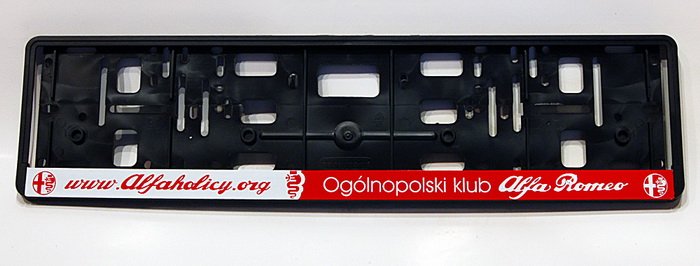
• Jeśli chcesz dodać swojej Alfie charakteru i jednocześnie zaznaczyć przynależność do naszej społeczności – to dobry moment, żeby je zamówić.

    Ramki Alfaholicy

    Szczegóły, zdjęcia oraz informacje o zamówieniu znajdziesz tutaj.

    Nie czekaj, bo jak zwykle schodzą szybko.

Android Auto

I have an 8.8' screen and Carlinkit 5.0. The image displays exactly the same as when wired, i.e., on full screen. I don’t see any difference in operation compared to the cable. The only drawback is that sometimes it doesn’t start automatically and you have to help it by manually initiating the Bluetooth connection.
Maybe you have a mid-life facelift unit, i.e., with a touchscreen.
The problem concerns pre-facelift cars, i.e., up to MY '19 inclusive.
 
Some, from version 3.1, AAWireless works in full screen via AA over CP (to enable in Settings) on older radios with an 8.8 screen. There are minor navigation problems within the AA menu but it is reasonably functional.

Sent from my SM-S908B using Tapatalka
 
Zibix, I checked in the program and I have AAWireless version 3.1.0, but I don’t see this in the settings. Where to find it?
 
Some, from version 3.1, AAWireless works in full screen via AA over CP (to enable in Settings) on older radios with an 8.8 screen. There are minor navigation problems within the AA menu but it is reasonably functional.

Sent from my SM-S908B using Tapatalka

So in pre-facelift with an 8.8" screen, via AA wireless v3.1 Android Auto works in full screen?
 
I have version 3.2.1, but in the changelog this functionality has been available since version 3.1. It works for pre-lift with an 8.8 display (March 2018). I’ve waited 5 years for this. In the phone app you tap the settings icon at the top right, then you search for the AA over CP icon, turn it on, it restarts to full screen. I tested twice for 10 minutes during driving today, including the update, will fiddle more in the evening. I’ve noticed minor issues with jumping between the menu and e.g. the maps app. Moving the controller upwards opens an additional menu that isn’t there via the AA protocol.

Sent from my SM-S908B using Tapatalka
 
I have version 3.2.1, but in the changelog this functionality has been available since version 3.1. It works for pre-lift with an 8.8 display (March 2018). I’ve waited 5 years for this. In the phone app you tap the settings icon at the top right, then you search for the AA over CP icon, turn it on, it restarts to full screen. I tested twice for 10 minutes during driving today, including the update, I’ll mess with it more in the evening. I’ve noticed minor problems with navigating between the menu and, for example, the Maps app. Moving the joystick upwards opens an additional menu that isn’t present through the AA protocol.

Sent from my SM-S908B using Tapatalka

I waited a long time for AA full screen too and didn’t get it, but the completely unused screen irritated me so much that earlier this year I switched to iPhone. Unfortunately, iOS isn’t my thing, I definitely prefer Android, so if AA were on full screen I wouldn’t need anything else…
 
I have version 3.2.1, but in the changelog this functionality has been available since version 3.1. It works for pre-lift with an 8.8 display (March 2018). I’ve waited 5 years for this. In the phone app you tap the settings icon at the top right, then you search for the AA over CP icon, turn it on, it restarts to full screen. I tested twice for 10 minutes during driving today, including the update, I’ll mess with it more in the evening. I’ve noticed minor problems with navigating between the menu and, for example, the Maps app. Moving the joystick upwards opens an additional menu that isn’t present through the AA protocol.

Sent from my SM-S908B using Tapatalka
Thanks for the info.
I updated AAWireless to version 3.2.1, and unfortunately I don’t see this option in the settings.
I’m wondering if I perhaps have an older device version, for which this feature isn’t supported...
How to check?

[EDIT]
I got feedback from AAWireless tech support. It turned out I have a first-generation device (purchased back on indiegogo.com).
These older devices don’t support full AA over CP screen unfortunately. I ordered a new device ;)
 
Last edited:
Hi, since version 3.1 AAWireless works in full screen via AA over CP (to enable in settings) on older radio versions with an 8.8 display. There are small navigation issues within the AA menu but it’s reasonably functional.

Sent from my SM-S908B using Tapatalka

Thanks for checking!
A Christmas present is coming :)
So you can order NEW (in the sense of v2) AAWireless
 
Last edited:
Today a new AAWireless device arrived. They are fast, gotta admit. Ordered the day before yesterday in the evening, delivered today.
AA over CP looks great. I just have some control issues, I don’t quite know my way around it ;)
 
They say you have to get used to it, this switching is still a workaround for the lack of touch. Maybe it can be improved somehow?

Regarding shipping/delivery times, it’s the norm in the shop where they try. From me to the UK where there are customs clearances, delivery is often under 24 hours - of course the customer must observe, e.g., in the morning so the courier can pick it up from us who is arriving before noon. Once it even managed to deliver to the USA, though usually 2 to 3 days are needed (unless the customs agent is blind and clueless and doesn’t see, for example, a second side of the invoice or something they grab onto the HTS codes and can add a few days to the clearance, but that’s rare)
 
Today a new AAWireless device arrived. They’re fast, I must admit. Ordered the day before yesterday in the evening, delivered today.
AA over CP looks great. I only have some issues with the controls, meaning I don’t quite know how to navigate in it ;)
Moving left with the knob is key; it switches between the skip mode across menus and windows and the element selection mode on the window or in the menu, the rotation navigates in the selected mode.

Sent from my SM-S908B using Tapatalka
 
Moving left with the knob is key; it switches between the skip mode across menus and windows and the element selection mode on the window or in the menu, the rotation navigates in the selected mode.

Sent from my SM-S908B using Tapatalka
Thanks, I’ll test it. I evidently didn’t need to move the knob downward.
 
sorry, that’s what you get when you reply according to an email notification - yes, I was thinking about the Carlinkit 4.0 that goes through ACP. I had ruled out that AAWireless would support that at all - when I still had Android I and the AAWireless author and I exchanged messages (since the AAGateway project), I often made logs from phones for him. Then when AAWIreless came along, I asked him about it again, and he claimed it wasn’t possible - it connects only through AA and acts as a bridge. Apparently someone persuaded him to switch from wired protocol to ACP - if that’s the case, IMHO it’s very possible if the developers try. It would surely be a cool feature for Android users, and for me as well - I have some second-hand 2nd gen radios MID/MID DAB, HIGH and HIGH DAB that I can unlock with AA/ACP activated, firmware and latest maps, and I also have 3 MID dongles - the argument about AA on the full screen could persuade many (because today people choose boxes ignoring that they have flaws - for example the audio quality over aux and other inconveniences like not being able to listen to maps via AA in the car radio, etc.)

epsonix I’m interested in a 2nd-gen radio for my Stelvio US... Send some info or contact details if you can
 
Zibix, is it also the case for you that the title of the playing track (e.g., from Spotify) stopped being displayed on the screen between the gauges? For me it only shows the USB symbol.
 
Zibix, is it also the case for you that the title of the playing track (e.g., from Spotify) stopped being displayed on the screen between the gauges? For me it only shows the USB symbol.
I didn’t notice this, I’ll check tomorrow. The question is whether it’s an issue with CP itself, maybe someone with an iPhone can comment if it displays for them. For me, for example, when I press the phone button it launches the phone app but from the car menu, when returning to AA the phone app is also open. They’ll probably be able to fix such small firmware bugs if they’re informed (AAWireless).

Sent from my SM-S908B using Tapatalka
 
For example, pressing the phone button launches phone functions but from the car menu, upon return to AA the phone app is also open. They’ll probably be able to fix such minor firmware bugs if they’re informed (AAWireless).
It’s exactly the same for me. I hope they’ll fix it ;)

[EDIT]I’ve sent them a request for support in this area.
 
Last edited:
And I have another question. I have Stelvio My22 and while I don’t have problems with Android Auto, it works wired and wirelessly over AA Wireless, but I can’t get CarPlay to start. Might be silly, but they’re trying to connect an iPad 9th generation and the car doesn’t detect it. Something needs to be changed or adjusted? I have the privacy restrictions off and so on, but nothing helps. I have an original 50 cm cable. Any hint what I’m doing wrong? Is it even possible to connect an iPad to Stelvio? I saw that other cars “accept” an iPad
 
Last edited:
Amortyzatory
Back
Top