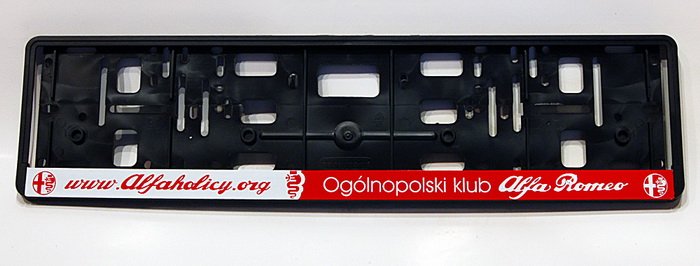
• Jeśli chcesz dodać swojej Alfie charakteru i jednocześnie zaznaczyć przynależność do naszej społeczności – to dobry moment, żeby je zamówić.

    Ramki Alfaholicy

    Szczegóły, zdjęcia oraz informacje o zamówieniu znajdziesz tutaj.

    Nie czekaj, bo jak zwykle schodzą szybko.

Blue&Me

Sierek

New
Joined
Sep 24, 2010
Messages
282
Age
66
Location
Bielsko-Biała
Car
Gulietta QV
The Media Player in the B&M system has a rather annoying quirk of playing tracks in alphabetical order by name. To play an album in its original order, you need to add to the track name the number of the next track on the disc. Manual editing is quite cumbersome and time-consuming. I found a small program that does this problem automatically. Additionally, it can organize a USB drive and delete unnecessary files.

Link http://www.spoelstrait.nl/BluMeUSB/ costs 5 euros. The demo version will add 10 tracks.
 
I’ve been using this program for several years and also recommend it. Its advantage is full control over renaming, but you can’t always add numbers to names automatically based on the file names.
 
Cars without Blue&Me should be banned from production. The pleasure of controlling an iPod from the steering wheel is priceless.
 
Are you controlling the iPod or is the iPod serving as a disk for the B&M controlled from the steering wheel?
A rhetorical question :)

Besides that, not too much - there are many more flexible solutions with better quality sound and also steered from the steering wheel. However, the full integration and ergonomics of the hands-free system and managing the phone are hard to overestimate. My brother has a Mitsubishi ASX - that’s a mess there. But it has the A2DP protocol and can actually play music from the iPod (and not just use its memory).
 
And here I was surprised after the purchase. My Blue&Me controls the entire iPod, its menu is projected onto the computer between the gauges (i.e., selecting author, playlists, albums, etc.). Interestingly, you don’t need this additional interface for that. And it sounds, as I already wrote in some other thread, really OK, comparable to what I achieved in my previous car with Blaupunkt Bremen MP76 tuned with a built-in microphone (factory speakers).
What’s nice is you can set the equalizer per source and someone even cleverly removed the 16 kHz slider from the radio settings so as not to boost FM band noise.
Question: can you somehow disable skipping when switching input via the medium waves, I would like it to skip only FM ranges and the CD or iPod input.
 
It’s not the iPod menu that’s projected, you’re seeing the Blue&Me menu. You’ll have the same as if you insert a USB drive instead of the iPod. Simple check: can you adjust volume directly on the iPod or control playback simultaneously with Blue&Me?
Unfortunately excluding the medium wave band when selecting a source is generally not possible by the methods (from the menu).
 
It’s not the iPod menu that’s projected, you’re seeing the Blue&Me menu. You’ll have the same as if you insert a USB drive instead of the iPod. Simple check: can you adjust volume directly on the iPod or control playback simultaneously with Blue&Me?

I can’t, the player takes control of the iPod. Similarly on the iPhone 4 the player takes over the iPod app. Sometimes with the iPhone 4 you have to wait a minute when the radio recognizes it as a Media Player. A great feature is automatic muting of music from the media player when the narrator for navigation on the iPhone speaks.
Generally, for happiness, it would be great if the onboard computer showed navigation arrows and the distance to the bend. However, with any attempt to update Blue&Me I still get the message "USB data configuration error"
 
The iPod serves only as an external disk. The Blue&Me player does not take control; it treats the iPod as a regular external drive and plays music by itself.
 
The iPod serves only as an external disk. The Blue&Me player does not take control; it treats the iPod as a regular external drive and plays music by itself.

IMG_1364.jpgIMG_1363.jpg

Blue&Me takes control of the iPod; on the computer’s display as well as on the radio I have all information from iTunes including playlists, authors, albums, genres of music, etc. This information appears instantly without any scanning of directories, which in a 120 GB data set would probably take several minutes.

Besides that I don’t have the iPod set to hard drive mode, I use only the library synchronized by iTunes, which isn’t directly visible if you set the iPod as an HDD.
 
Last edited:
The same information on the computer’s display at a glance you have from any USB flash drive (Blue&Me has surprisingly efficient indexing). Condition - the files must be tagged and if you use playlists - they must exist on the flash drive.

Besides, if in your opinion that is the iPod playing music “under Blue&Me’s control,” then how does it get back to the speakers? Blue&Me doesn’t have A2DP protocol. Through the USB cable?

Let’s end this discussion; there are many more interesting Blue&Me topics to explore... :)
 
;-)
All iPods have an analog signal on the lower connector. Most docks for iPod, besides the output to a cable for synchronization/charging, also have an analog line-out. It’s a bit different with iPhone 4, which on such docks doesn’t want to play analog and you have to buy dedicated docks with iPhone 4 support. Probably some Apple patents require the accessory manufacturer to pay a fee.

The difference between HDD mode and native iPod mode is that in disk mode you cannot control the iPod in any way; it behaves like a standard HDD where USB is only an interface for charging and data transfer. So you can simultaneously see the iPod as a disk and play a song from it independently. The catch is that in this mode the analog sound won’t go through the USB cable; it goes only to the headphone output.

The control mode can be recognized by the fact that the controlling device takes over the iPod, while iPod control is blocked. That’s the mode for example in Pioneer receivers, where the entire iPod menu is pushed to the TV, and with the receiver’s remote you control the iPod functions shown on the TV. In such a mode Blue&Me also takes control in my BM version.

However, I have no idea why they invented this additional adapter for Blue&Me, since everything Blue&Me needs from the iPod it handles natively, without this interface.
Maybe it was intended for some older software versions?
 
I don’t have Blue&Me system, but I’d like to play music from the iPod in the car. Besides this device, do I have any other radio frequency options?
 
Aux input if your radio version has one. Look in the glovebox in front of the passenger, on the right at the top. If it’s there, the quality will be better and more reliable than the radio transmission, where in bigger cities you may need to change the channel because the signal from the transmitter will overlap with a local radio station.
 
Thank you for the answer. The problem is that the original radio doesn’t have any possibility to connect anything. I thought you could “add” an aux or USB input to the radio. Unfortunately I’m not at all knowledgeable about electronics, and at the dealer they said it’s very complicated and such a USB output would cost about 1500 zł, if it’s even possible. Yet despite my lack of automotive-electronic knowledge, I don’t think there isn’t any other option... I didn’t realize that in a quite decent car from 2011, playing music from an iPod could be so problematic...
 
Thank you for the answer. The problem is that the original radio has absolutely no possibility to connect anything. I thought you could “add” an aux or USB input to the radio. Unfortunately I’m not at all knowledgeable about electronics, and at the dealer they said it’s very complicated and such a USB output would cost about 1500 zł, if it’s even possible to do. Yet despite my lack of electronic knowledge I don’t think there isn’t any other option... I didn’t realize that in a quite decent car from 2011, playing music from an iPod could be so problematic...

You can buy a transmitter that broadcasts on radio frequencies, then you’ll receive it through the radio - like a normal radio station.
The drawback is slightly worse quality and the need to change the channel in larger cities where a station could appear on the frequency you chose.
There are tons of them on Allegro
http://allegro.pl/sprzet-car-audio-transmitery-14172
 
perhaps it’s like in Bravo radios without Blue&Me
that at the back there is a plug for an AUX cable.
But that would probably require removing the panel to take the radio out and check... Or first figure out the radio schematic so you don’t unnecessarily disassemble the dash
 
Ciao! I had the same problem and… first I bought a transmitter where you can connect a USB drive (USB port) etc. But that’s not the best solution because you plug that into the cigarette lighter and then set your frequency on that device and on the radio, and the connection isn’t great. So I bought a nice Clarion radio clarion 201.JPG and everything is fine. The transmitter costs about 100, so why spend 1500 PLN??? (I can resell for an agreed price)
 
digital changer

Wouldn’t it be simpler to buy a digital changer like XCARLINK? It’s available on Allegro.
 
Amortyzatory
Back
Top